Hajj and Umrah campaign software

Run every pilgrim, flight, room, bus and payment from one place.

ManasikPro replaces scattered spreadsheets and endless WhatsApp messages with a single system your whole team works in at the same time, with the same up-to-date information for everyone.

Private to your team

Every staff member signs in with their own account. Pilgrim data is never visible outside your team.

Built for several staff at once

Everyone works from the same up-to-date information, so nobody is working from an old copy.

You review before anything is saved

Scanned and imported data is always checked by a person first.

What is inside

Every part of the campaign, explained

Here is what each part of ManasikPro does, in detail.

Overview

A live campaign dashboard

Open the app and see the whole campaign at once: how many pilgrims are registered, where every visa stands, how much has been collected, and who needs attention today.

  • Headline numbers for pilgrims, visas, passports, payments, buses and rooms
  • Visa status chart and registration timeline
  • Group progress and payment progress at a glance
  • At-risk table listing pilgrims with missing passports, rejected visas or overdue payments
  • Recent activity feed of everything your team changed
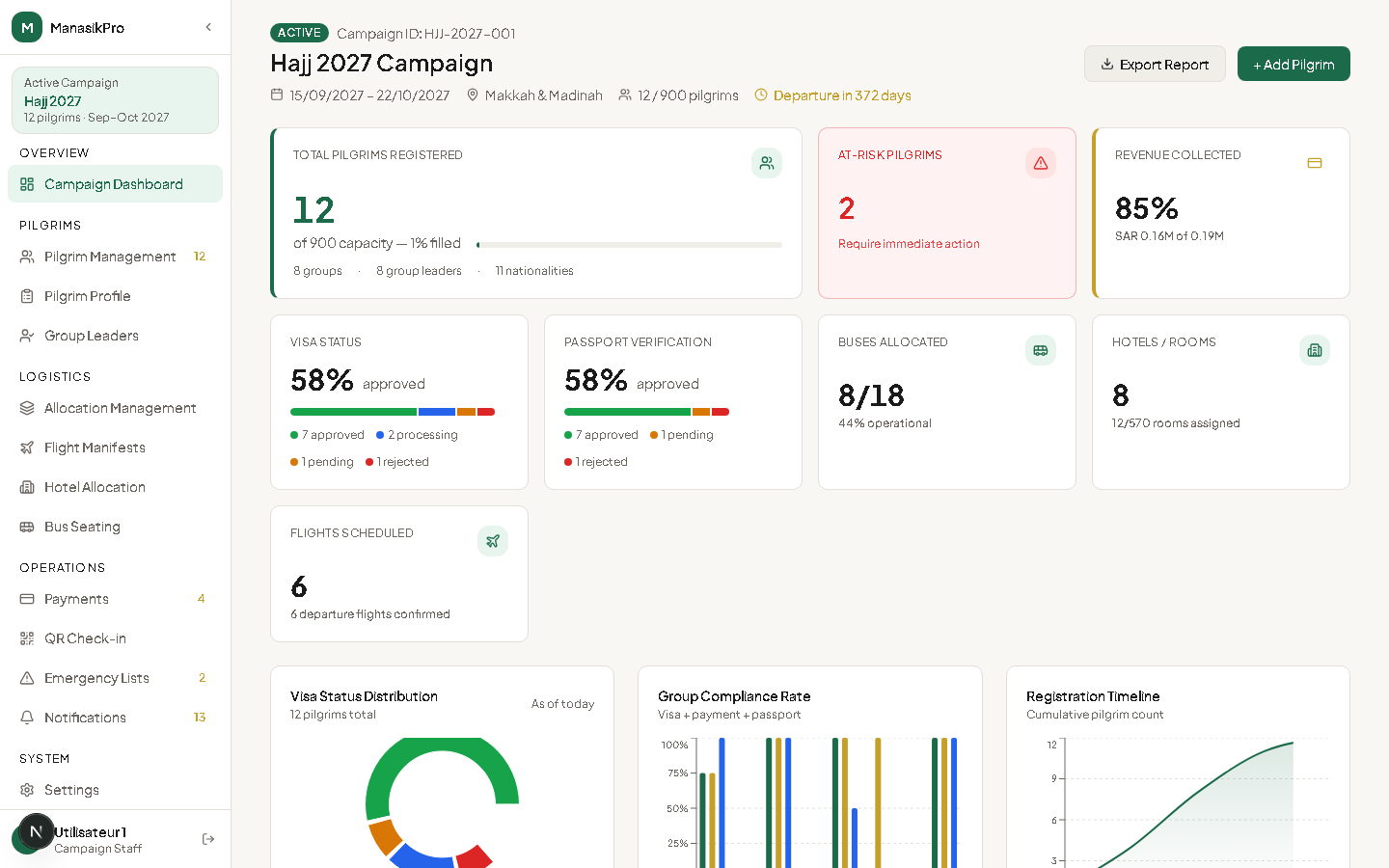
ManasikPro campaign dashboard
Pilgrims

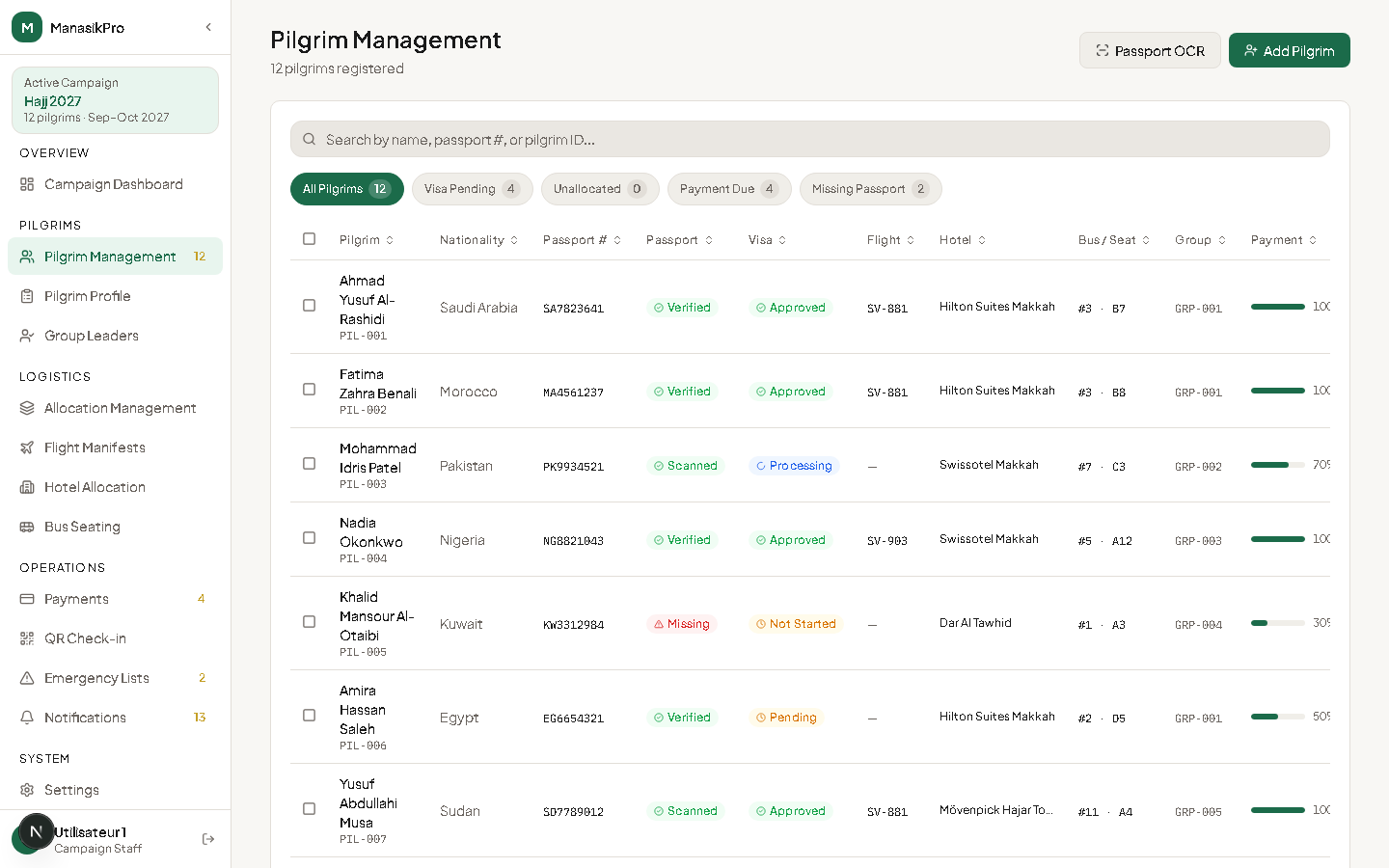
Every pilgrim, in one organized table

Register pilgrims one by one, or import a whole group from a spreadsheet. Search, filter and act on many pilgrims at once instead of editing rows by hand.

  • Add, edit and review each pilgrim’s details, passport and contact information
  • Bulk import from Excel with checks before anything is saved
  • Assign a whole selection of pilgrims to a group leader in one action
  • Bulk delete, with a confirmation step before anything is removed
  • Filter by visa, passport, payment or group status and export the result
ManasikPro pilgrim management table
Passport scanning

Scan a passport, skip the typing

Photograph a passport and ManasikPro reads the machine-readable zone to fill in the pilgrim’s record. Your staff checks every field before it is saved.

  • Reads the MRZ strip: name, passport number, nationality, dates and sex
  • Nothing is saved until a staff member has reviewed and confirmed it
  • Works from a phone camera or an existing photo
  • Avoids the copy mistakes that come with typing names by hand
Pilgrim profile

One complete file per pilgrim

Open a pilgrim and see everything about them in one place: documents, visa progress, travel and accommodation, payments, and the history of every change.

  • Personal information, passport data and the MRZ line
  • Visa tracking timeline from application to approval
  • Flight, bus seat and hotel room assignment directly from the profile
  • Payment history with the remaining balance
  • Activity log for that pilgrim and a direct WhatsApp button
Group leaders

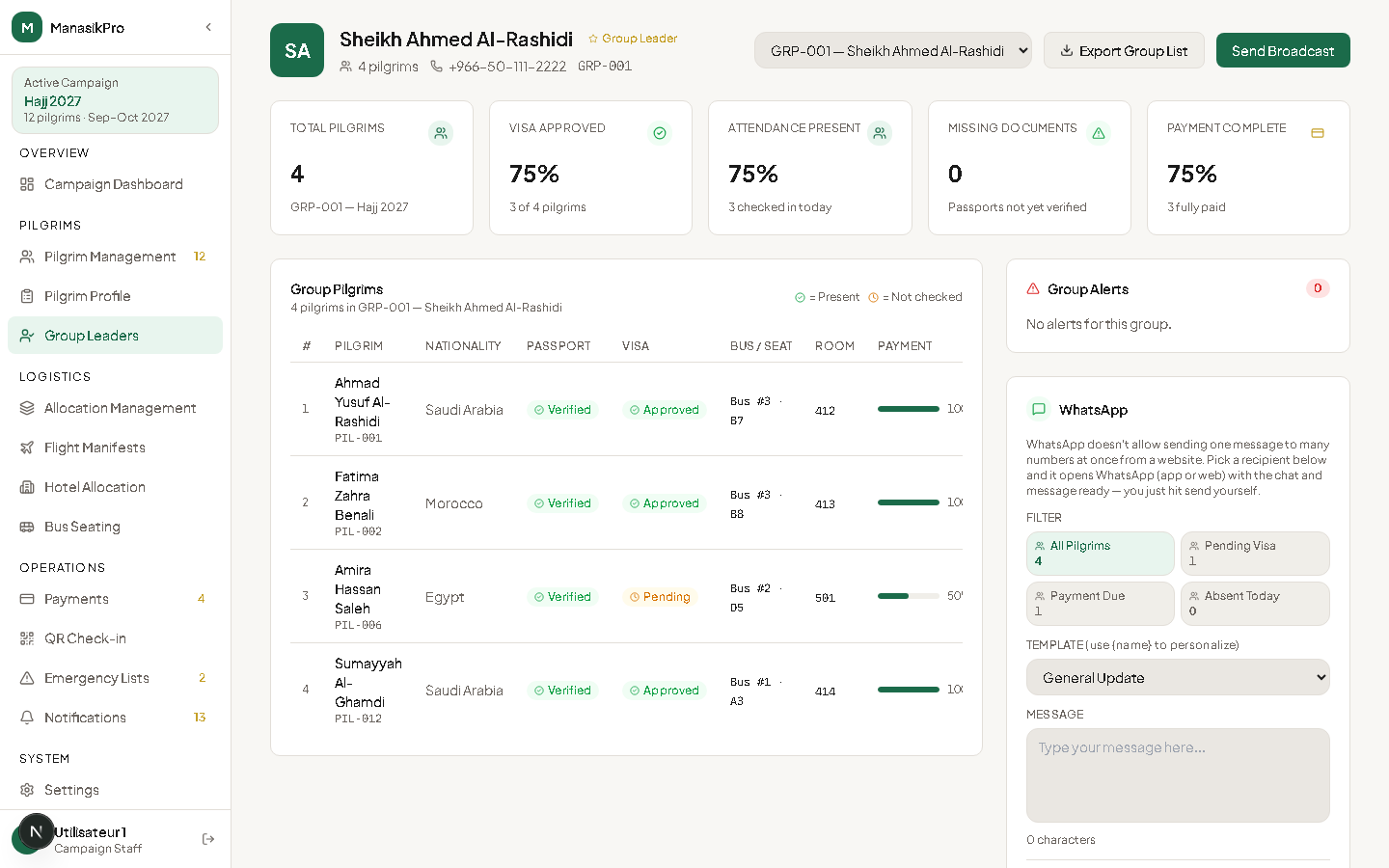
A dashboard for every group leader

Each group leader sees only their own pilgrims, their status, and what is still missing, and can message any of them on WhatsApp with one click.

  • Per-group view of pilgrims, documents and payments
  • WhatsApp panel with ready-to-send messages for reminders and requests
  • Clear list of what each pilgrim still needs to complete
ManasikPro group leader dashboard
Logistics

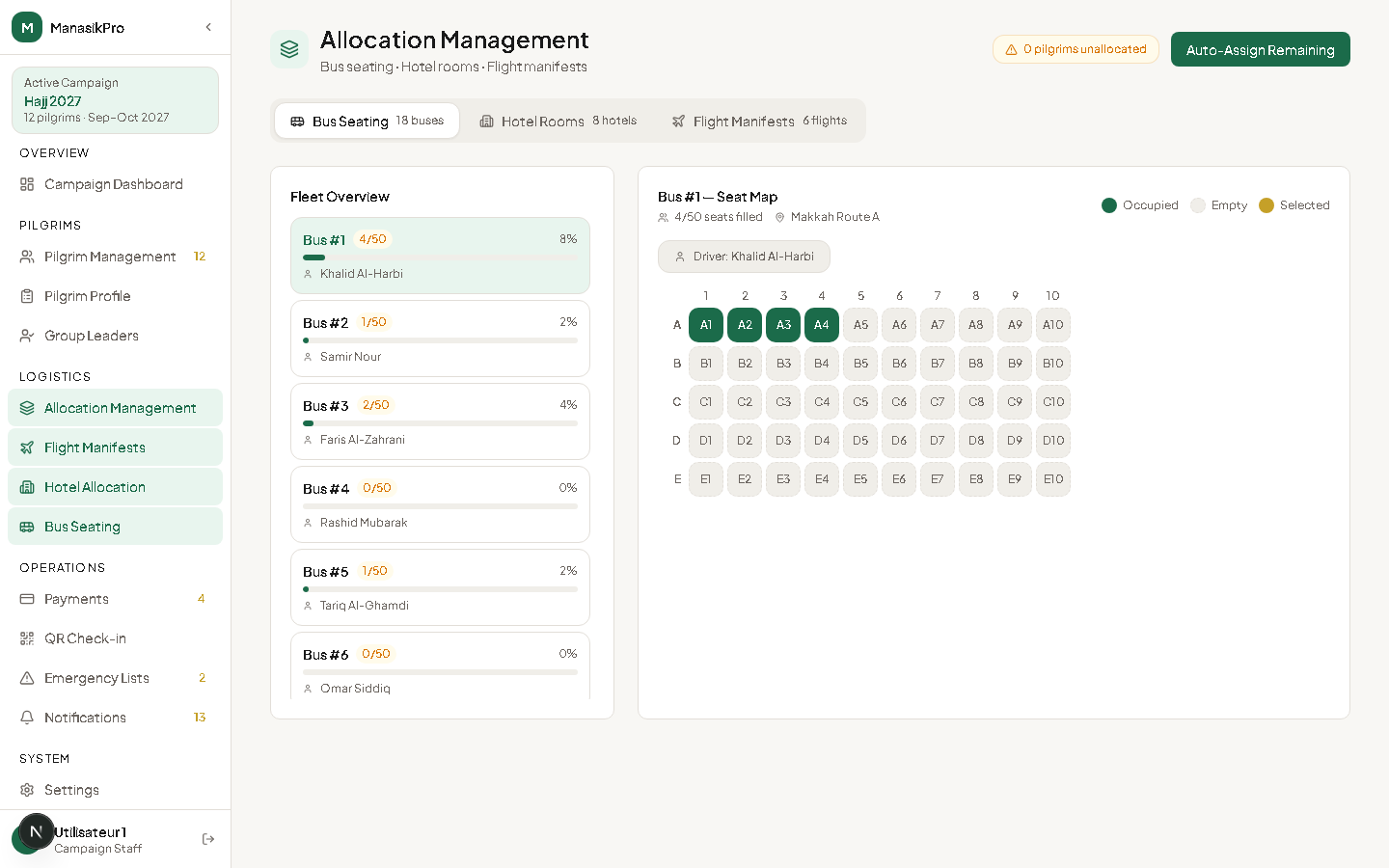
Flights, hotels and buses, planned in one place

Build flight manifests, assign hotel rooms and place pilgrims on buses. When you are short on time, one button places every unassigned pilgrim automatically.

  • Flight manifests, with flights imported from an Excel file
  • Hotel and room allocation for Makkah and Madinah, with check-in and check-out dates
  • Bus seating with a visual seat map for each bus
  • Auto-assign: fills remaining buses and rooms while keeping groups together where possible
  • Every assignment is saved immediately and shows up on the pilgrim’s profile
ManasikPro bus and hotel allocation
Payments

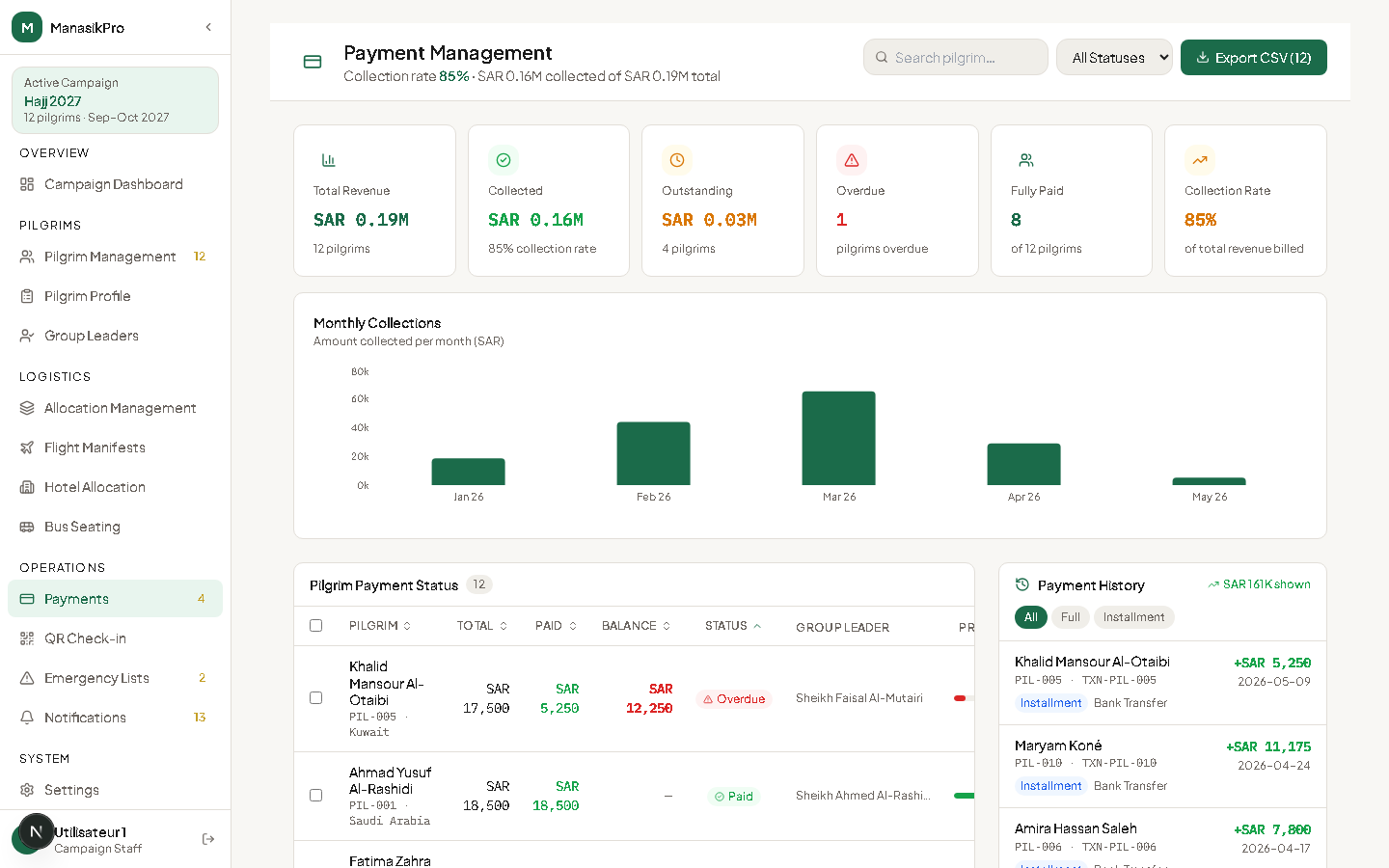
Know exactly who has paid and who still owes

Record every payment as it arrives, see each pilgrim’s balance, and handle refunds. Nothing is lost in a spreadsheet, and every amount has its history.

  • Record payments with method, date and reference, in SAR, USD, EUR or GBP
  • Balance and “remaining after this payment” calculated while you type
  • Refunds recorded as negative amounts, shown clearly in red
  • Full payment history for each pilgrim, and a list of recent payments
ManasikPro payments overview
Finance

Invoices, expenses and reports

Bill pilgrims with proper invoices, track what the campaign spends, and export clean reports for your accountant.

  • Create invoices for a pilgrim and download them as PDF
  • Link a payment to an invoice; the invoice becomes paid once it is fully covered
  • Log expenses by category and compare revenue with spending month by month
  • Export pilgrims, payments, expenses and a campaign summary as CSV for Excel
Day of travel

Check-in, emergencies and alerts

On the day, the team checks pilgrims in with a QR code, pulls emergency contacts in seconds, and gets alerts about what needs action.

  • QR check-in to mark pilgrims as arrived or departed
  • Emergency lists with contact details, ready to print or export
  • Notifications for missing documents, rejected visas, overdue payments and unassigned pilgrims
Seasons

Start a new season without losing the last one

When a season ends, archive it in one step and start the next from a clean slate. Past seasons stay available to open, export and compare.

  • Archive the full current season with its pilgrims, logistics, payments and invoices
  • Start the next season under a new name and date
  • Export any past season as a full JSON backup, a pilgrim CSV, or a PDF summary

How it works

From first registration to departure

  1. 01

    Import or scan

    Bring pilgrims in from an Excel file or a passport photo.

  2. 02

    Assign

    Put pilgrims into groups, flights, hotels and buses, manually or automatically.

  3. 03

    Collect

    Record payments and invoices as money comes in and follow every balance.

  4. 04

    Travel

    Check pilgrims in on the day and keep emergency contacts one tap away.

Interested? Talk to us directly.

Ask about the software, a demonstration for your team, or how it fits your campaign. We reply on WhatsApp and by phone.

Talk to us on WhatsAppSign in